

Your Dynamics GP partner may have moved on if tickets close without fixes, one person holds all the knowledge, junior staff field hard questions, and nobody mentions your version’s support dates. Test it with a small, real request.
TL;DR. Partners rarely announce that they’ve lost interest in GP, so you find out when a ticket sits for a week or the one person who knew your setup disappears. Watch for seven signs, starting with unfixed tickets and single points of failure and running through turnover, silence on support dates, a migration-only roadmap, stale documentation, and no recent GP work. Run the quick test for each before you decide anything.
Picture this. You sent a question on Monday, and it’s Friday. Is that a bad week or a pattern? Our Dynamics GP support team takes over from partners who’ve drifted away, and these are the seven signs we see most.
A caveat first. We’d gain if you switched, so hold us to the same list.
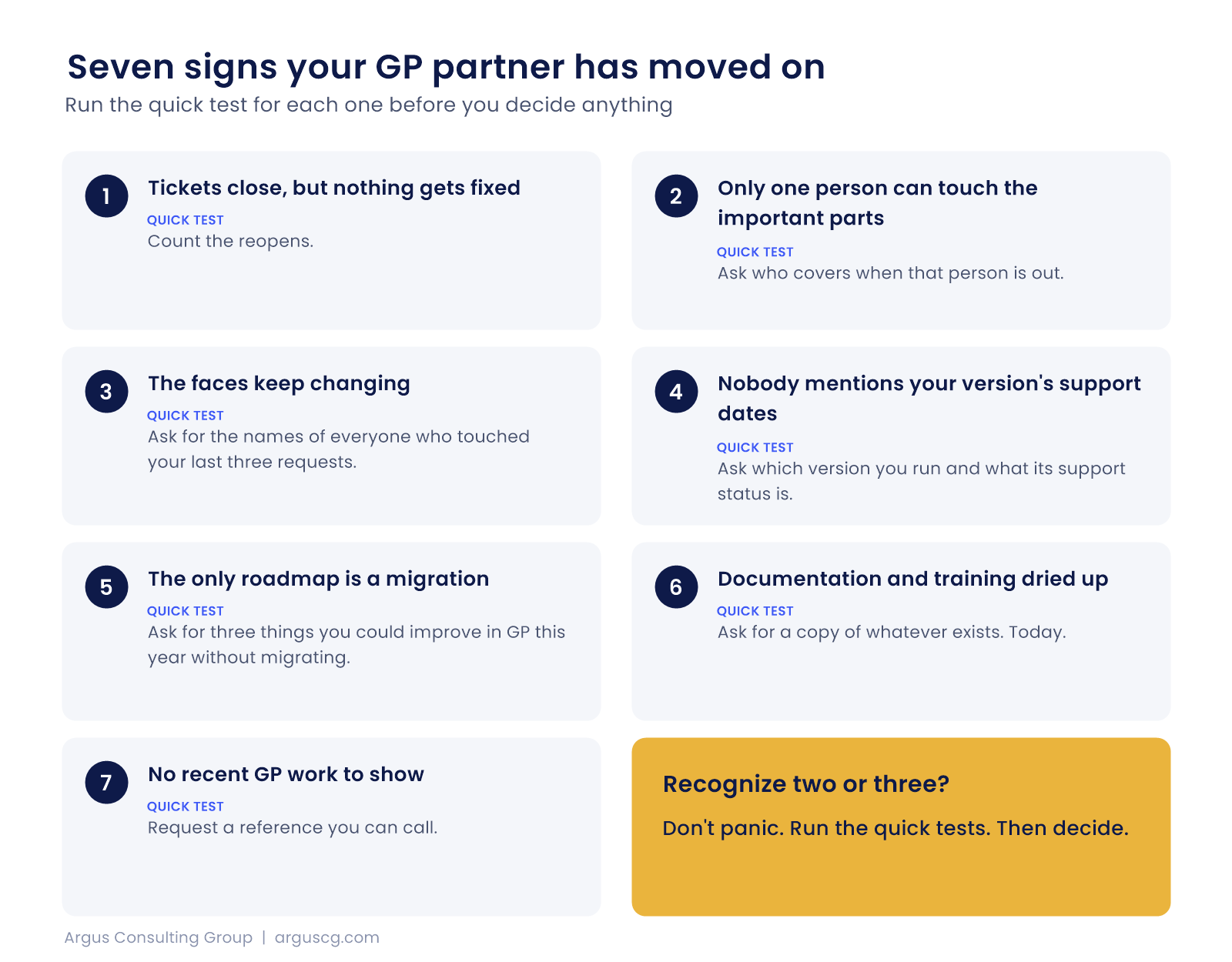
1. Tickets close, but nothing gets fixed
Look at your last ten support requests. How many were marked resolved and then came back?
OpenGov, a government software vendor, lists “long, confusing ticket cycles” among its red flags for financial system support, with issues that get “resolved” without being fixed. That’s a software vendor writing about its own market, not Dynamics, but the pattern shows up everywhere, because a closed ticket and a solved problem are two different things and only one of them helps your close.
Quick test. Count the reopens. More than a couple means a process problem.
2. Only one person can touch the important parts
OpenGov flags a second sign too, which is having only one person qualified to support critical modules. If your payables integration, your payroll setup, or your month-end reports each depend on a single consultant, you have a key-person problem, and it becomes your problem the day that person leaves.
Quick test. Ask who covers when that person is out. Listen to how long the pause is.
3. The faces keep changing
TechTarget’s 2022 list of warning signs in implementation partners includes frequent employee turnover, too many junior employees, and overworked consultants. That piece is about implementation rather than support, so treat it as a close cousin. The signals still carry over. If you can’t name the people who worked on your last three issues, or the names keep changing from one request to the next, ask why.
Quick test. Ask for the names of everyone who touched your last three requests, and how long each has worked with GP.
4. Nobody mentions your version’s support dates
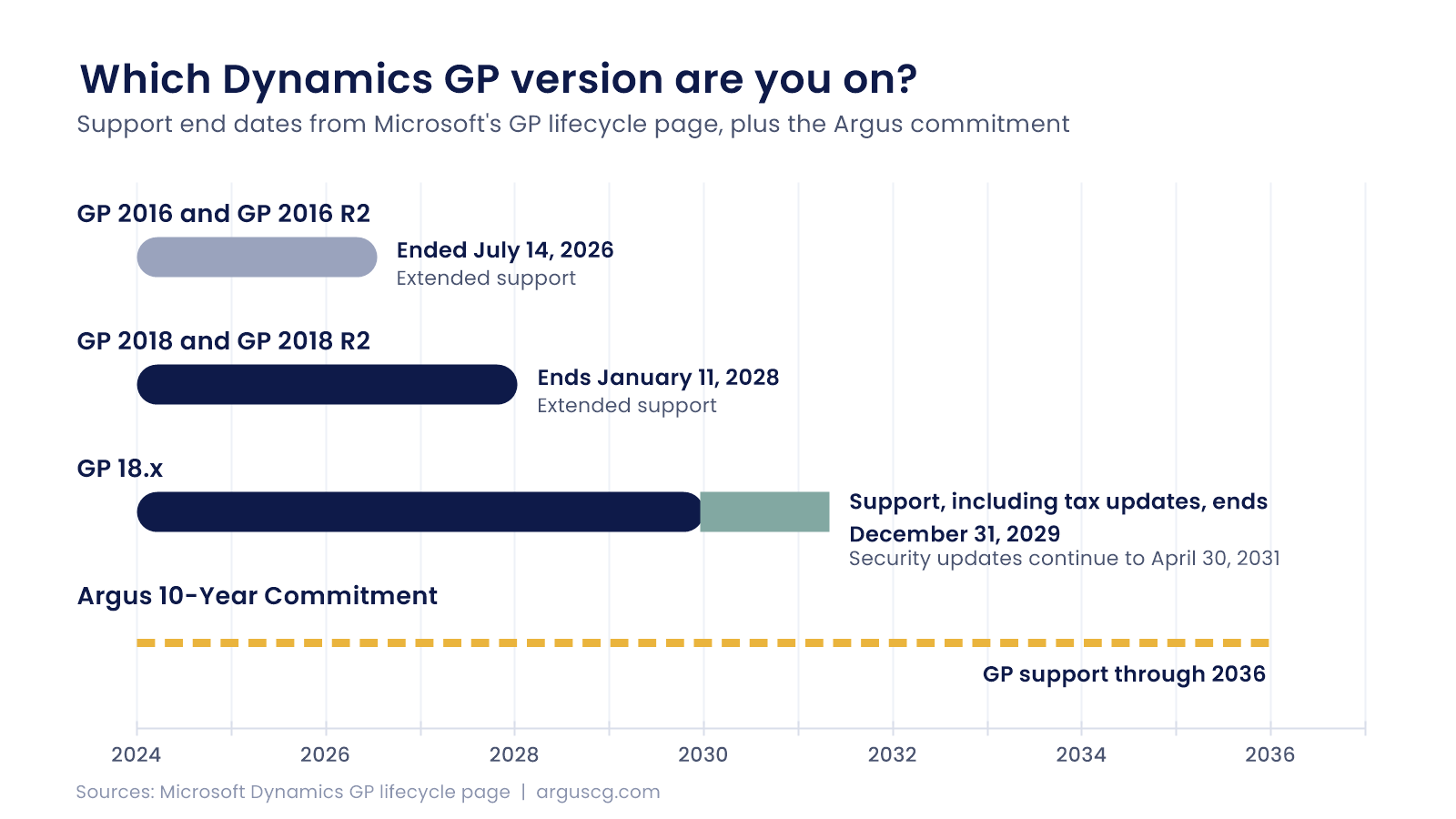
A partner who’s paying attention tells you when your version’s support runs out. Per Microsoft’s lifecycle page, GP 2016 and 2016 R2 extended support ended July 14, 2026, and GP 2018 and 2018 R2 extended support ends January 11, 2028, while current GP 18.x support, including tax updates, ends December 31, 2029, with security updates continuing to April 30, 2031.
Do you know which of those applies to you? If your partner never raised it, that’s a sign.
Quick test. Ask your partner which version you run and what its support status is. A good answer takes thirty seconds.
5. The only roadmap is a migration
Microsoft’s own GP page says the company is “encouraging customers to transition to Dynamics 365 Business Central,” so a partner raising Business Central isn’t odd. The sign is when it’s the only thing they raise, and optimization, hosting, integrations, and cleanup never come up in any conversation. For a longer look at this one, see what to do when your GP partner pushes a migration.
Quick test. Ask for three things you could improve in GP this year without migrating. Notice whether you get an answer.
6. Documentation and training dried up
TechTarget also lists little or no training and partners who encourage dependence. When did someone last walk your team through a change? Is there a current document that describes your customizations, integrations, and scheduled jobs? If the answer lives in one consultant’s head, it isn’t documentation. It’s a risk.
Quick test. Ask for a copy of whatever exists. Today.
7. No recent GP work to show
Ask for a GP project they finished in the last year, in a company like yours. A partner that’s still invested in GP has one.
Don’t lean on badges. The Microsoft Partner Center pages we reviewed describe the Solutions Partner program without mentioning Dynamics GP, so a designation tells you little about GP depth. See the partner program overview if you want to check for yourself.
Quick test. Request a reference you can call.
What it looks like when it’s real
We’ve taken over from partners that drifted. A Southern California bank came to us because its original GP implementor wasn’t cutting it anymore, and a healthcare organization with 60-plus entities came to us after its partner grew and lost interest in a client that wasn’t flashy enough. Neither left over one missed call. They left over a long drift.
If you recognize two or three of the seven, don’t panic. Run the quick tests. Then decide. Our post on questions to ask before switching GP partners walks you through the next step, and if your partner has already retired, start with what to do when your GP partner retires.
Argus has committed to supporting GP through 2036 under the Argus 10-Year Commitment, and we handle migrations to Business Central in-house when you’re ready.
Questions about a GP partner who’s checked out
How can I tell if my GP partner has lost interest?
Check for unfixed tickets, a single consultant who holds critical knowledge, rotating staff, silence about your version’s support dates, a migration-only roadmap, stale documentation, and no recent GP projects. Two or three together is a pattern, not a bad week.
Is slow response time enough reason to switch?
One slow week isn’t reason enough, but a trend across several requests is. Track how long your last ten requests took and how many reopened, then raise it with your partner in writing. Their response tells you whether the problem is fixable inside the relationship.
What should my partner tell me about GP support dates?
Which version you run, when its support ends, and what that means for you. GP 2018 and 2018 R2 extended support ends January 11, 2028, and GP 18.x support ends December 31, 2029, with security updates to April 30, 2031. Silence on any of this is a warning.
Does a Microsoft partner badge prove they’re good at GP?
Not really, because the Microsoft Partner Center pages we reviewed describe the Solutions Partner designations without mentioning Dynamics GP. A badge can show general standing with Microsoft, but it says little about who supports your GP system or how quickly they respond.
What should I do first if I think my partner has moved on?
Get your own copy of your documentation, version details, and a list of customizations and integrations before you raise it. That protects you whichever way the conversation goes. Then run the quick tests, and compare options.
Not sure if it’s the partner or the system?
Tell us what’s been happening. We’ll tell you whether it sounds like drift or a one-off, and what we’d check first. Start with a Free Business Assessment, or call (626) 403-9744.