

Microsoft Dynamics 365 Business Central is Microsoft’s financial and operations system for small and midsize businesses. It covers accounting, inventory, purchasing, sales, and projects in one platform, and it’s the product Microsoft points Dynamics GP customers toward.
If your company runs Dynamics GP, you’ve heard the name Business Central a lot lately. Usually from someone with a quote to sell. This page explains what it is, what it costs to license, and what a move from GP really involves, and it’s written for the controller or CFO who has to make the call, not for the person selling the project. If you’d rather talk through your own situation first, our GP to Business Central migration page is the place to start.
Want a second set of eyes on where you stand? Ask for a Free Business Assessment.
What Business Central does
Microsoft describes Business Central as a business management solution for small and midsize organizations. Its documentation names finance, manufacturing, sales, shipping, project management, and services as core areas. In plain terms, one system holds your general ledger, payables, receivables, bank reconciliation, inventory, purchasing, and sales orders.
Same job as GP. Newer platform.
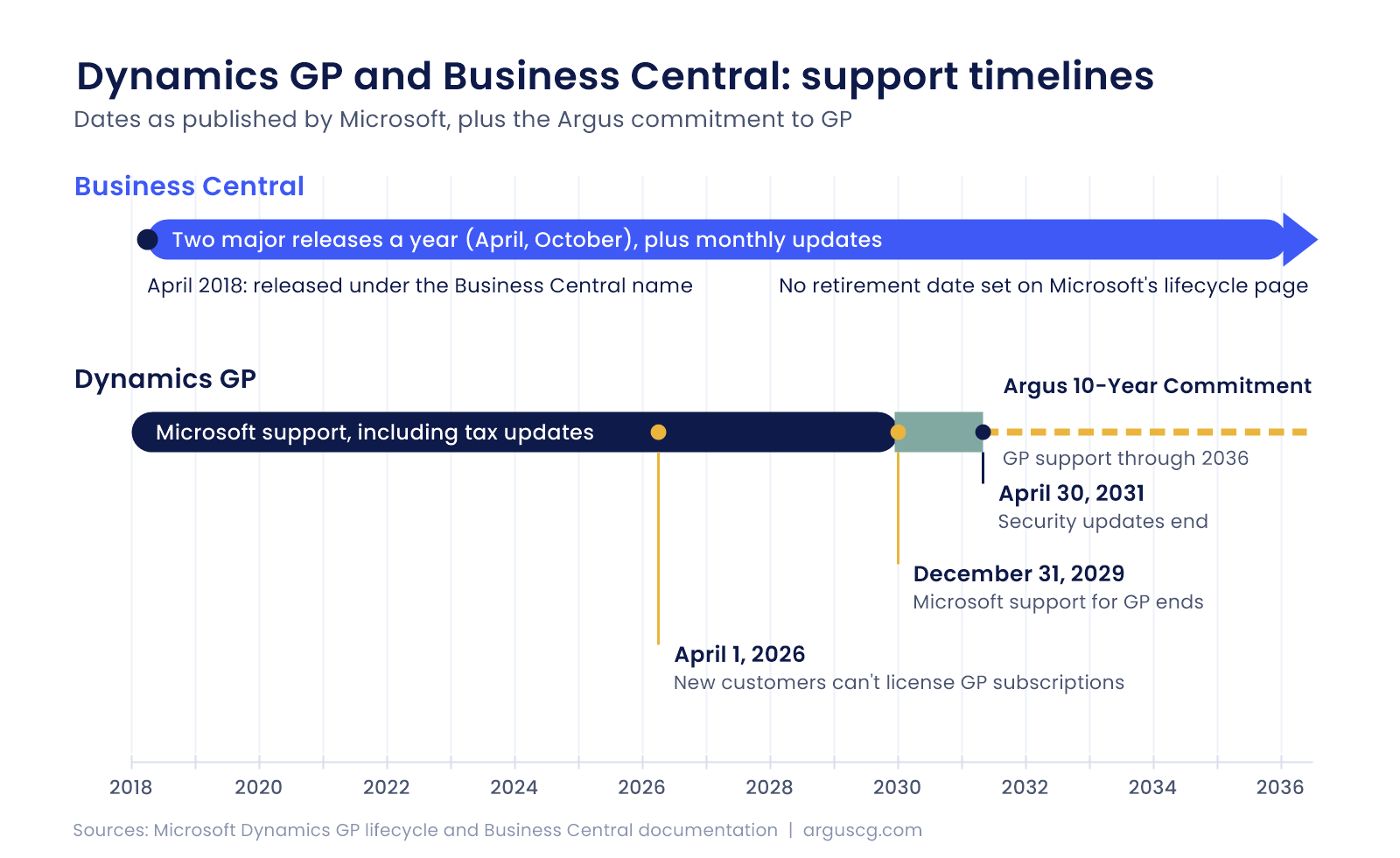
You can run it online in Microsoft’s cloud, and Microsoft’s documentation lists an on-premises option too. Updates follow a set rhythm, with two major releases a year in April and October and smaller updates in the months between. Predictable, at least. Microsoft says 55,000 companies use it. That’s a real installed base.
Where it came from
Business Central didn’t appear out of nowhere. It grew out of Navision, a Danish financial system Microsoft bought in 2002, which later became Dynamics NAV. Microsoft released Business Central under its current name in April 2018. That’s a long track record for a product with a fairly new label on it. Not a startup.
Business Central compared with Dynamics GP
| Dynamics GP | Business Central | |
|---|---|---|
| Where it runs | On SQL Server, hosted or in-house | Online, with an on-premises option |
| Release rhythm | Three planned releases a year (June, October, December) | Two major releases a year (April, October), plus monthly updates |
| Support horizon | Support ends December 31, 2029. Security updates run to April 30, 2031 | No retirement date set on Microsoft’s lifecycle page |
| New customers | New customers can’t license GP subscriptions after April 1, 2026 | Sold today |
| Customizing | Older tools such as eConnect, which Microsoft says it isn’t actively fixing because of the product’s life cycle | AL extensions, plus apps from Microsoft’s marketplace |
On paper, that table looks lopsided. But a table can’t show how your business actually runs. That’s the part that decides whether a move makes sense, and no spec sheet covers it.
What the licenses cost
Microsoft’s pricing page lists three per-user prices, all per month and paid yearly. Essentials is $80. Premium is $110 and adds service management and manufacturing. Team Member is $8, for people who read, approve, and make limited updates. Microsoft notes that actual prices can vary by currency, country, and region. Pricing varies. We checked the page on September 30, 2026.
A license price isn’t a project price. Not even close. Data work, add-on apps, training, and the implementation itself sit on top of it, and those line items vary far more from company to company than the per-user rate does. It adds up. Ask early. We walk through what to look for in a quote in Got a $200K Business Central Quote?
What AI does inside it
Microsoft says Copilot comes included at no extra cost. The agents are another story. Microsoft’s newer agents for payables, sales orders, and expenses are online only, and its pricing page says they need an Azure subscription and Copilot credits. Worth knowing before you plan around them.
What a move from GP involves
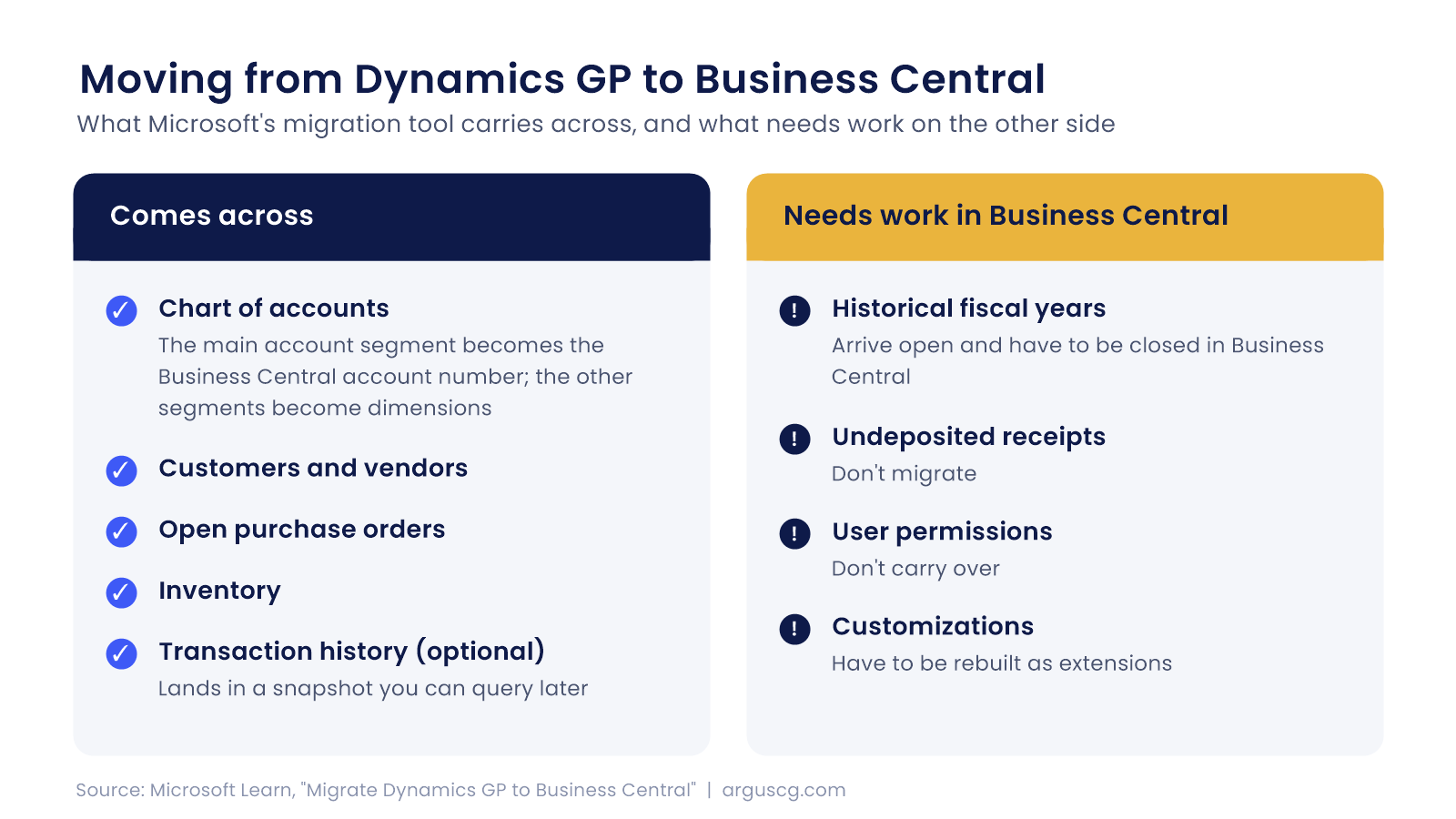
Microsoft’s migration tool carries a lot across. Your chart of accounts maps over, with the main account segment becoming the Business Central account number and the other segments becoming dimensions, and customers, vendors, open purchase orders, and inventory come along with it. Transaction history is optional and lands in a snapshot you can query later. History is the big decision.
Some things don’t move. Fiscal years marked historical in GP arrive open and have to be closed in Business Central. Undeposited receipts don’t migrate. User permissions don’t carry over, and customizations have to be rebuilt as extensions. Plan for that.
Stephen Tanner, our founder, puts the bigger point this way. “Software solutions by themselves don’t solve business problems. Improved business processes enhanced by software solutions make a more meaningful difference.” That’s the lens we use.
So we treat a migration as a business decision first and a technical project second. If you’re weighing it, our migration team can walk through what would move, what wouldn’t, and what it would take to rebuild the rest.
When the timing is right
Microsoft’s dates are real, since GP support ends December 31, 2029 and security updates run to April 30, 2031, but those dates give you a planning window and they don’t tell you when to move. Take the window seriously. Don’t take it as an order.
Some companies will move next year because their processes outgrew GP. Others will stay put for years and be fine. Both are normal. Argus has committed to supporting Dynamics GP through 2036, which we call the Argus 10-Year Commitment, and we handle GP to Business Central migrations in-house. Either path runs through the same team. No handoff.
Questions finance leaders ask about Business Central
Is Business Central just the next version of Dynamics GP?
Not really, because Business Central comes from a different product line, Navision, so it’s a separate system rather than a GP upgrade. That’s why Microsoft’s migration moves your data into a new Business Central environment instead of upgrading in place. Accounts, customers, and vendors come across, but customizations and user permissions have to be rebuilt.
What does a license actually cost per user?
$80 per user per month for Essentials and $110 for Premium, paid yearly, based on Microsoft’s list prices. Team Member licenses run $8 for people who read, approve, and make limited updates. Actual pricing can differ by region, and implementation costs are separate.
Do we have to move before 2029 ends?
If you run GP today, you don’t have to move on a date Microsoft picks, but support for GP, including tax updates, ends December 31, 2029. Security updates continue to April 30, 2031.
What you do inside that window is a planning decision. We’d rather you make it with real numbers than with a countdown clock running in the background.
Will our processes carry over, or will we have to change how we work?
Usually both, since some of what you do in GP will map closely and some of it will need to be rebuilt or rethought.
Who handles the move if we already trust our GP partner?
Argus handles both, because the team that supports your Dynamics GP system also handles the Business Central migration. Nobody has to learn your system from scratch.
We don’t push either direction. If staying on GP is the right answer for your company, we’ll tell you that, and we’ll support it through 2036. If a move makes sense, we’ll plan it around your calendar, not ours.
Talk through where you stand
Tell us about your current system and how it’s working for you, and we’ll give you an honest read on whether Business Central, a stronger GP setup, or something in between fits, with no pressure either way. Start with a Free Business Assessment, or call (626) 403-9744.